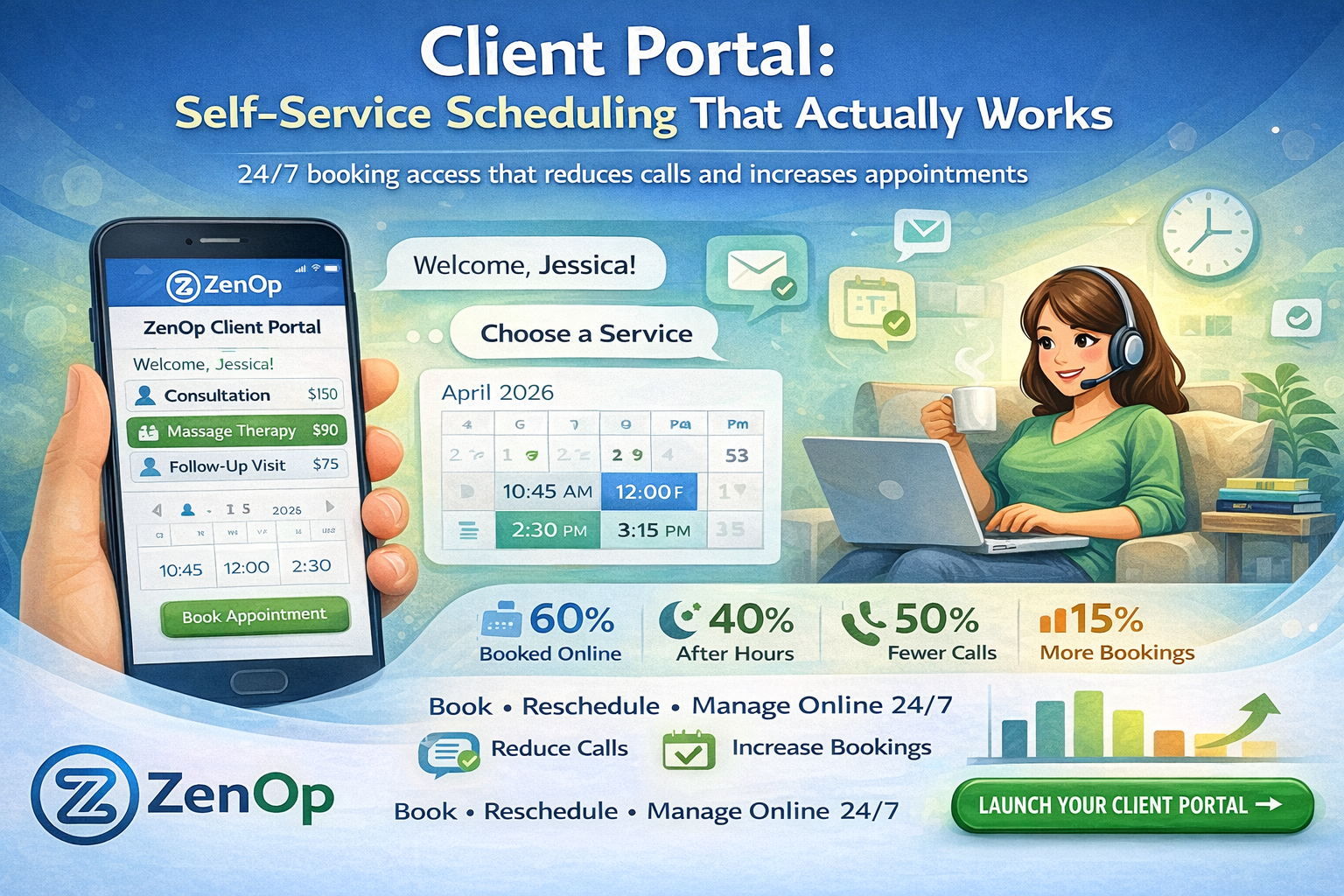
Client Portal: Self-Service Scheduling That Actually Works
Give your clients 24/7 access to book, reschedule, and manage appointments on their own terms. Reduce phone calls, increase bookings, and deliver a modern experience.
24/7 booking access that reduces calls and increases appointments
Your clients have one thing in common: they're busy.
They don't want to call during business hours, wait on hold, or play phone tag to book a simple appointment. They want to pull out their phone at 10pm, find an available slot, and book it, done.
The question isn't whether to offer online booking. It's whether your current solution actually works.
A client portal that works gives clients real-time availability with smart matching (right service, right provider, right time), one-click rescheduling from confirmation texts, automatic waitlist management, and a branded experience that feels like your business. It reduces scheduling calls by 50% while increasing total bookings by 15%.
TL;DR
- 60% of appointments shift to online booking when clients have a good self-service option
- 40% of bookings happen outside business hours, capturing demand you'd otherwise miss
- Smart matching ensures clients book the right service, provider, and duration automatically
- One-click rescheduling from confirmation texts keeps appointments on the books instead of becoming cancellations
- Works alongside the AI receptionist, clients who prefer calling still get the same great experience
The Problem With Most Online Booking
You've probably tried online scheduling before. Maybe it sort of worked. More likely:
It created more work. Double bookings, sync issues, clients booking wrong appointment types.
Clients still called. The system was confusing, so they picked up the phone anyway.
It felt impersonal. A generic booking form doesn't reflect your brand or service quality.
No flexibility. Rescheduling required a phone call. Cancellations disappeared into a void.
What a Real Client Portal Looks Like
ZenOp's client portal isn't just a booking widget. It's a complete self-service experience:
Smart Scheduling
Clients see only the appointment types relevant to them, with real-time availability that accounts for:
- Service duration and buffer times
- Staff availability and specializations
- Equipment or room requirements
- Your custom booking rules
Intelligent Matching
When a client selects a service, ZenOp matches them with the right provider:
Client selects: "Deep tissue massage - 90 min"
Portal shows: Only therapists certified in deep tissue, with 90-minute slots available
No confusion. No booking the wrong person.
Frictionless Rescheduling
Life happens. When clients need to change appointments:
- One-click access to reschedule from their confirmation email/text
- See alternative times instantly
- Confirm the change in seconds
- Automatic notifications to your team
Waitlist That Works
When their preferred time isn't available:
"Thursday at 3pm is fully booked. Would you like to join the waitlist? We'll text you immediately if a slot opens up."
When someone cancels, the next person on the waitlist gets notified automatically, and can claim the spot instantly.
Branded Experience
Your portal, your brand:
- Custom colors, logo, and imagery
- Personalized welcome messages
- Service descriptions in your voice
- Intake forms that match your process
Clients feel like they're booking with you, not some generic tool.
Integration, Not Replacement
The client portal works alongside ZenOp's AI receptionist:
Phone calls: When clients call, the AI can direct them to the portal for self-service, or handle booking right on the call.
After booking: Clients receive AI-powered reminders through the same system.
For those who prefer calling: The AI handles them just as easily. No client is forced into self-service.
The Data You Need
Your dashboard shows:
- Bookings by source (portal vs. phone vs. walk-in)
- Peak booking times
- Most popular services
- Cancellation and reschedule patterns
- Waitlist conversion rates
Understand how clients want to book, and optimize accordingly.
Real Impact
Businesses with client portals see:
- 60% of appointments booked online (vs. phone)
- 40% of bookings happen outside business hours
- 50% reduction in scheduling-related calls
- 15% increase in total bookings (from 24/7 availability)
Setup in Minutes
- Connect your calendar and services
- Customize your portal's look and feel
- Add your booking link to your website, social, and email signature
- Share with clients, and watch bookings roll in
Give your clients the modern booking experience they expect. ZenOp's client portal handles scheduling 24/7, so your phone stops ringing and your calendar stays full.
Frequently Asked Questions
How is this different from Calendly or other booking tools? Generic booking tools show a list of time slots and let people pick one. ZenOp's client portal includes smart matching (right service, right provider, right duration), real-time availability that accounts for buffer times and staff specializations, automatic waitlist management, and integration with the AI receptionist. It's a complete scheduling system, not just a calendar widget.
Can clients reschedule without calling? Yes. Every confirmation email and text includes a one-click reschedule link. Clients see alternative times instantly and confirm the change in seconds. Your team gets automatic notifications. This is a major reason businesses see a 50% reduction in scheduling-related phone calls.
Does the waitlist actually work? Yes. When a client's preferred time isn't available, they can join the waitlist with one tap. When a cancellation opens that slot, the next person on the waitlist gets an instant text and can claim it immediately. This fills gaps automatically without staff involvement. For more on how appointment management reduces no-shows, see appointment reminders.
Can I customize how the portal looks? Yes. Your portal uses your logo, brand colors, imagery, and voice. Service descriptions are written by you. Intake forms match your process. Clients feel like they're booking with your business, not a generic third-party tool.
Does it replace the AI receptionist? No. They work together. Clients who prefer to call get the AI receptionist. Clients who prefer to book online get the portal. Both feed into the same calendar and the same SMS follow-up system. No client is forced into one channel or the other.
What booking data can I see? Your dashboard shows bookings by source (portal vs. phone vs. walk-in), peak booking times, most popular services, cancellation and reschedule patterns, and waitlist conversion rates. This data helps you understand how clients prefer to book and optimize accordingly. See pricing.
Get notified when ZenOp launches in your area
We're rolling out across the US. Be the first to know when ZenOp is available for your business.
No spam. Just launch updates.